Manage Sales. From Order to Payment.

Manage customers, orders, deliveries, invoices, recoveries, and sales performance with Gluon ERP.
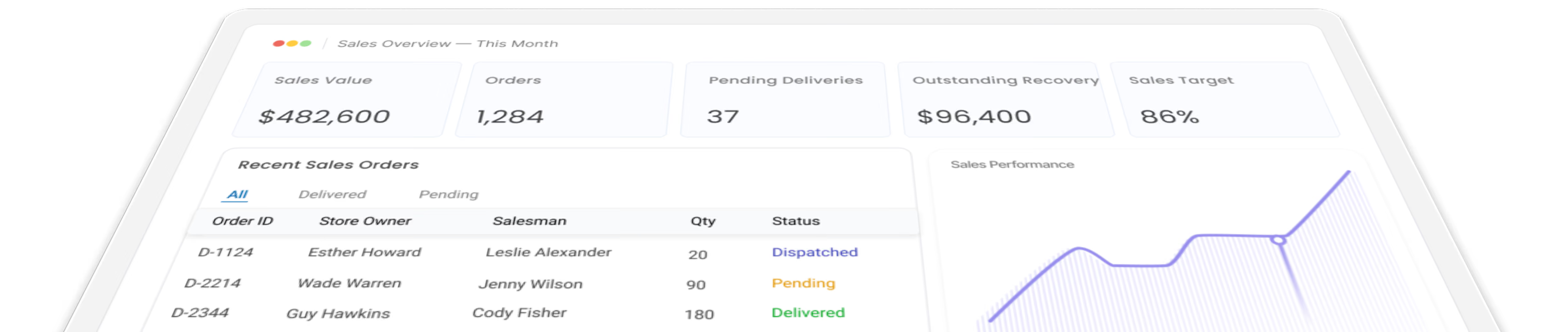

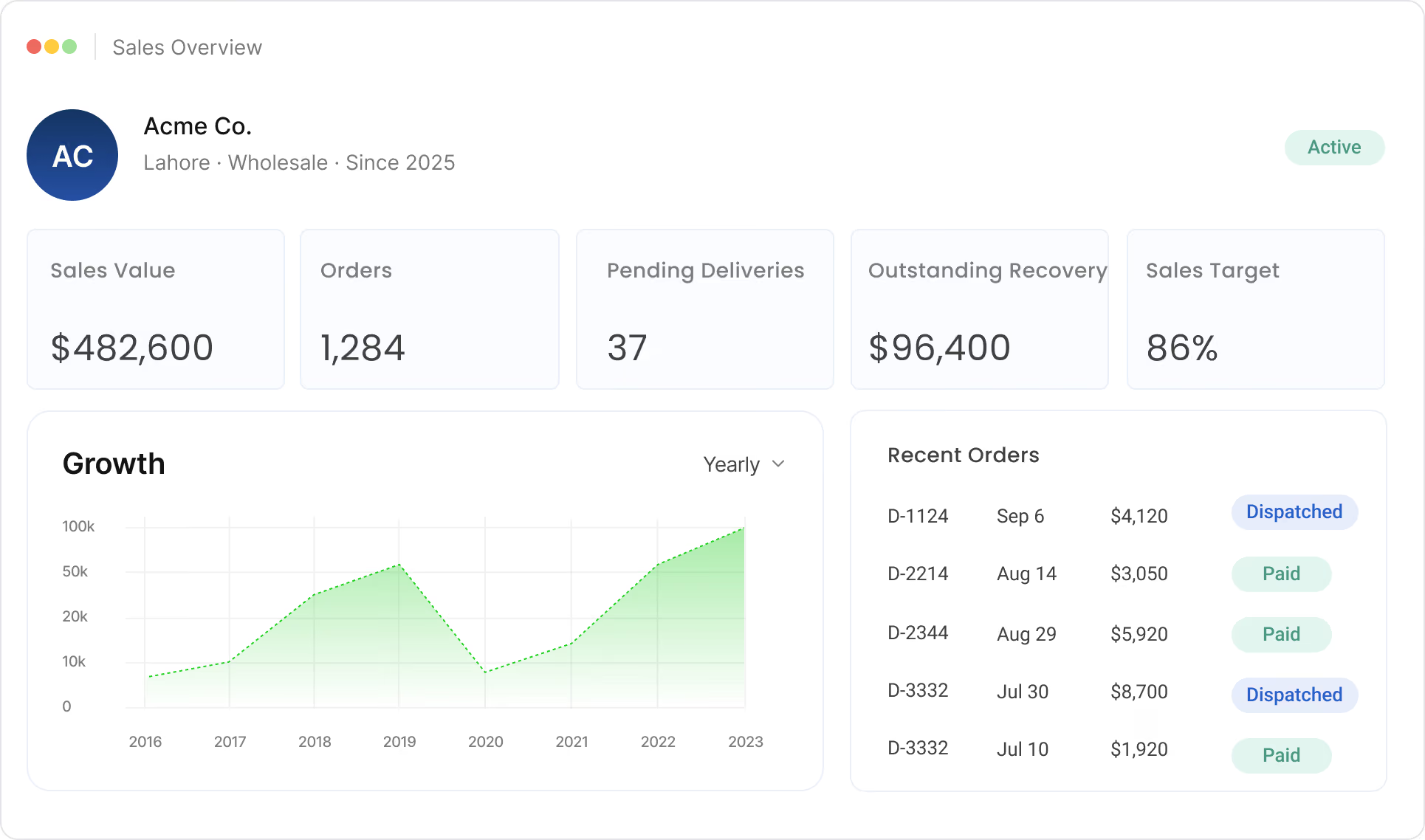
Gluon Erp Sales dashboard showing revenue, orders, and performance chart.

Drive Better Sales

Manage customers, sales orders, targets, recovery, and performance with ease.

Easy Your Purchase Mangement

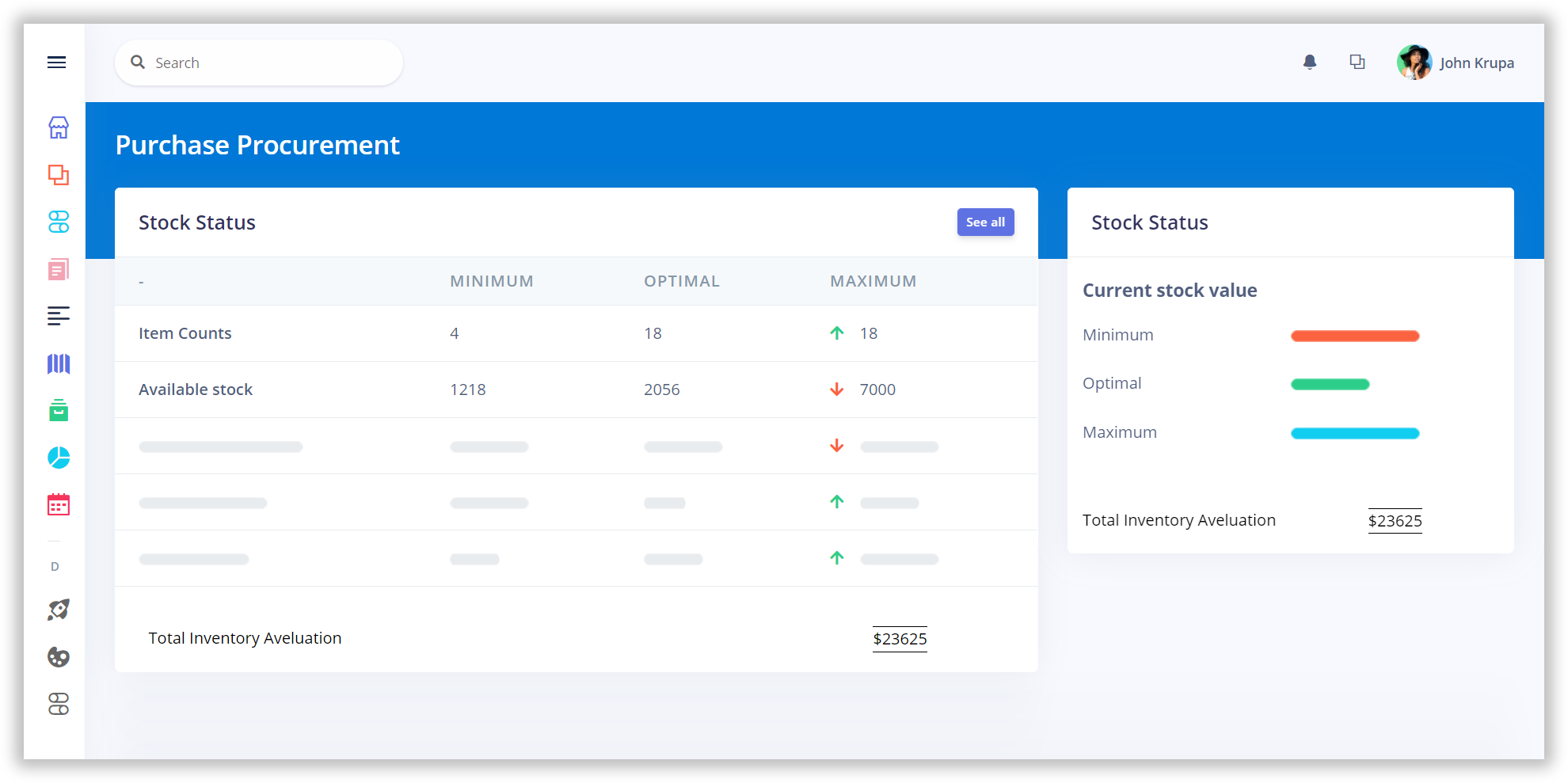
Link your purchase orders to inventory and access exact stock levels,seasonal trends moment history and supplier lead time. Use Gluon ERP Purchase Mangement module to autoamte your procurement and vendor management and grow with the leading ERP Solutions provider .

Maximize unlimited benefits

Purchase Management has a vital role to play, in a manufacturing organization. It procures the items/material required by an organization and thus fulfills the necessary item requirements of various departments.
The basic purpose of this module

The basic purpose of GLUON ERP Purchase Management Module is to streamline the functioning of procurement or purchase of inventory (raw-material), assign orders to suppliers and bill.
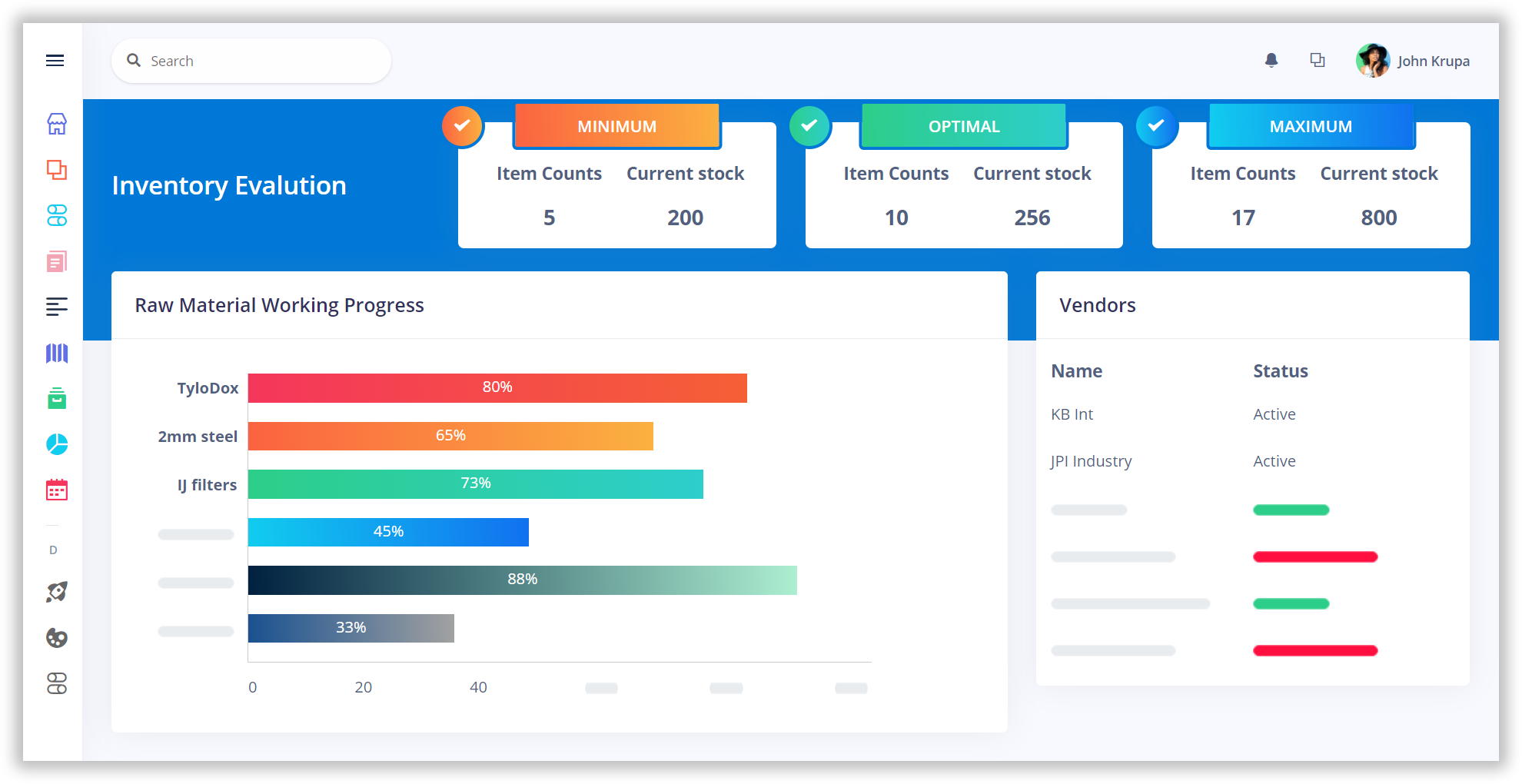
Functions of purchase management module

All purchasing and subcontracting activities such as inviting quotations, supplier evaluation, placing purchase-order, order scheduling and billing are covered in this purchase management module. Import of goods is also handled by the system.
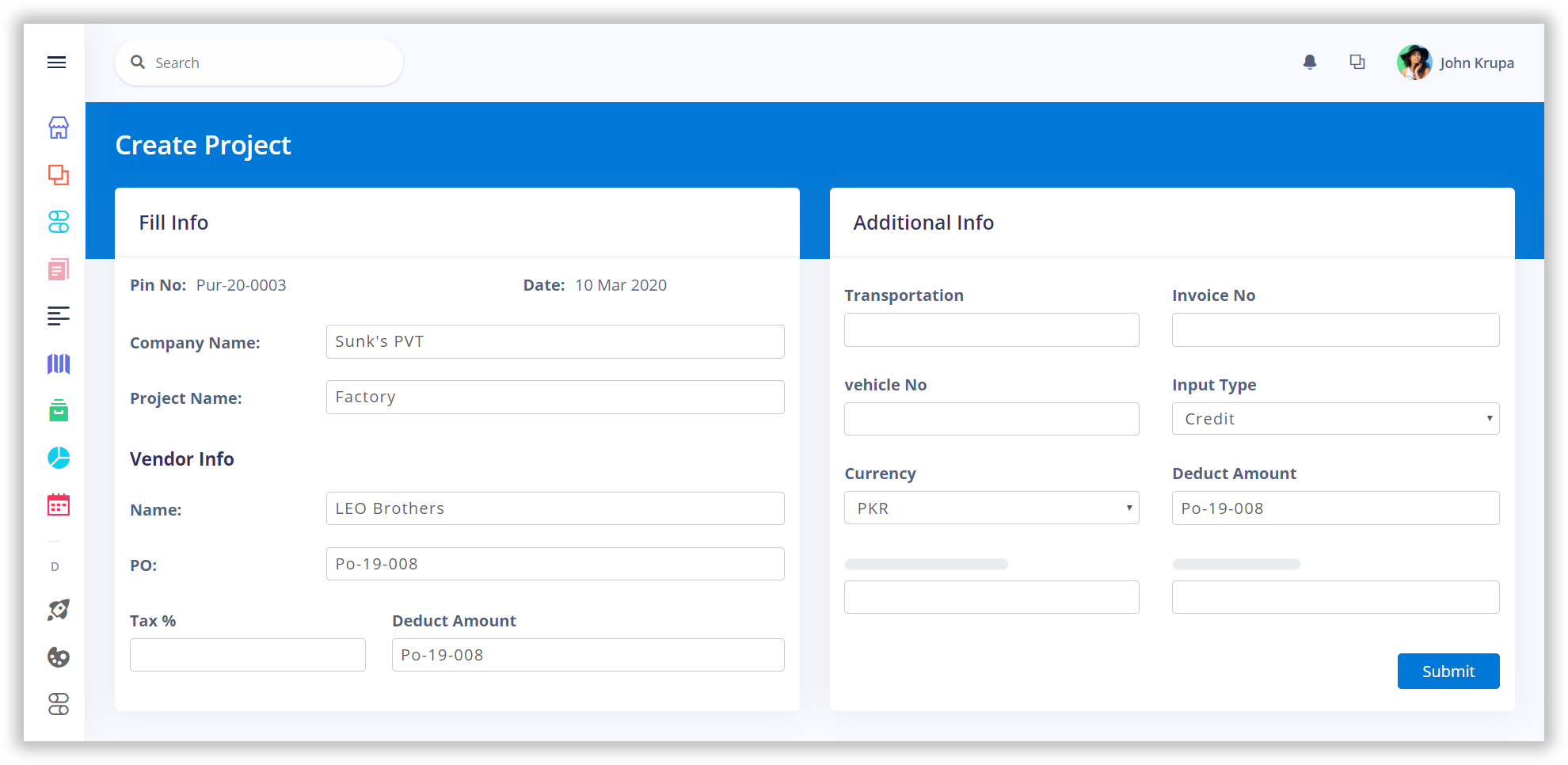
Measure the efficiency

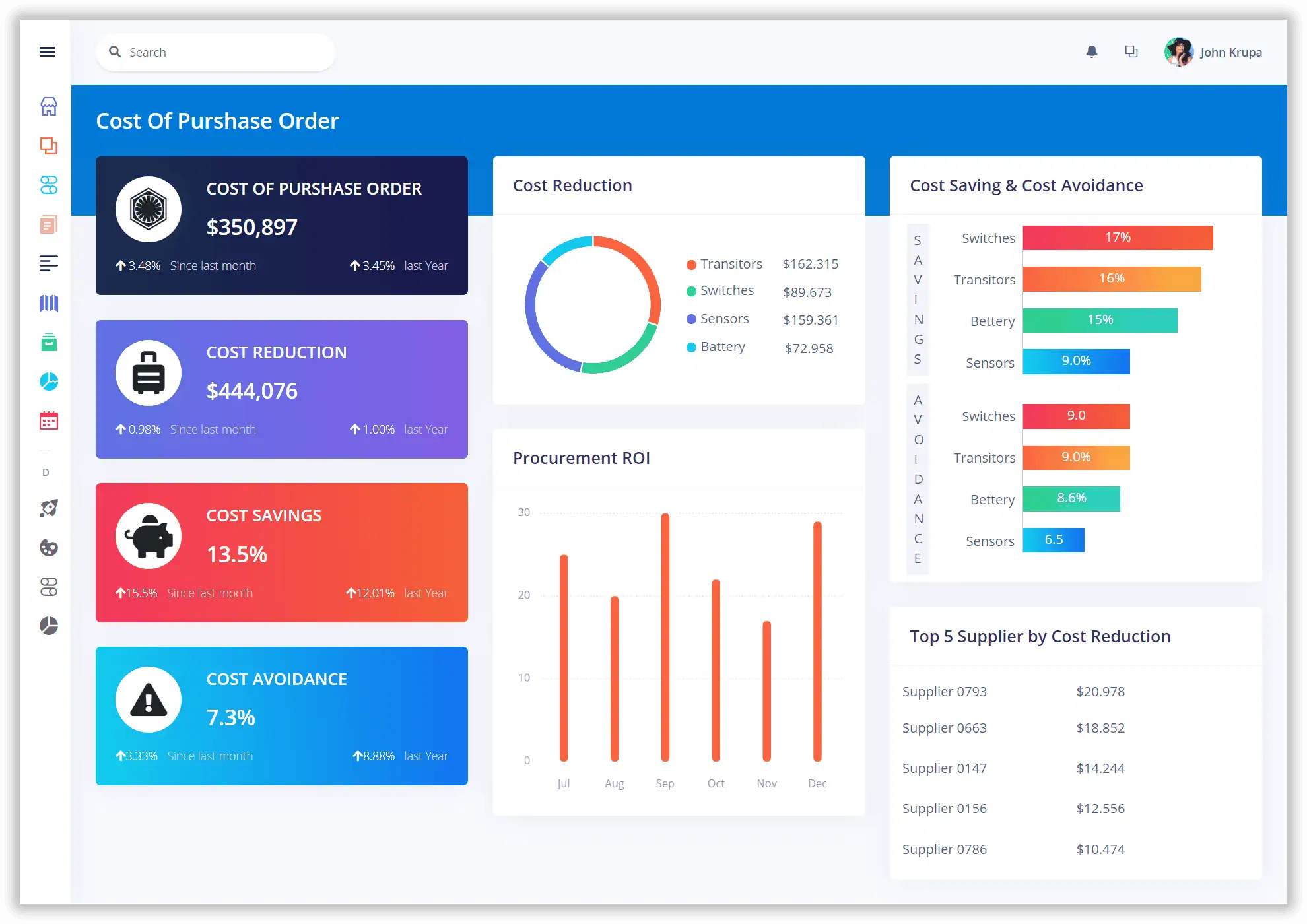
Our Purchase Management Module integrated with related functional processes keeps a constant check on the stock levels and generates timely purchase orders for cost effective inventory replenishment.
One platform.
Every part of your business.

and
working together in one powerful, connected platform.
Book a Demo
Built to simplify. Designed to scale.

From First Quote to Final Payment.

Keep every stage of the sales cycle connected, traceable and easy to manage.
White circular outline with a white minimalist user silhouette inside on a black background, representing a profile icon.Simple user avatar icon showing a circle for a head above a rounded rectangle body, in blue color on a white background.Simple blue user profile icon depicting a round head and shoulders silhouette on a white background.
Customer
Icon of a square with a folded top-right corner and three horizontal lines inside, representing a document or form.Icon of a checklist with two circular bullet points and horizontal lines representing text, enclosed in a rounded square border.Icon of a checklist with two bullet points and horizontal lines representing text, in blue color.
Quotation
White paper chart showing steady sales growth from 2016 to 2021, with revenue rising from $1.2M to $11M.Blue icon of a document with three horizontal lines representing text and a folded top-right corner.Icon of a blue document with a folded top-right corner and three horizontal white lines representing text.
Sales Order
Outlined black icon of a delivery parcel box with an arrow circling around it clockwise, symbolizing carbon delivery or eco-friendly shipping.Blue icon of a cardboard box with motion lines indicating fast delivery or shipping.Icon of a purple open cardboard box with two lines indicating motion from the left side, suggesting delivery or shipping.
Delivery
Illustration of a tiered platform with three people performing different yoga poses, ascending from left to right; the first person is in a low lunge, the second in a warrior pose, and the third in tree pose, all against a background with abstract shapes and green leafy plants.Blue circle with an icon of a document featuring a percentage symbol and lines representing text.Blue icon depicting a percentage symbol above three horizontal lines representing text or data.
Invoice
Icon depicting a user profile silhouette inside a circular arrow, symbolizing account recovery or reset.Icon of a document with a curved arrow pointing counterclockwise, symbolizing refresh or reload.Blue document icon with a curved arrow pointing left, symbolizing undo or revert action.
Recovery
Icon of a document with a bar chart and a magnifying glass representing document performance analysis.Blue bar chart with three ascending bars from left to right and an upward arrow indicating growth or increase.Bar chart with three ascending bars and an upward arrow indicating growth or increase.
Performance
Customer & Sales

Keep Customer and Sales Data Organized.

View customer details, sales, inquiries, statements, and salesperson performance.
Simple user icon with a round head and shoulders outline inside a square with rounded corners.
Customer Information
Icon of a document with text lines and a magnifying glass in the lower left corner, symbolizing inquiry or search.
Customer Inquiry
Icon of a percentage symbol inside a circle with a diagonal slash through it.
Customer-wise Sales
Icon of a document with lines representing text and a folded corner at the top right.
Customer Statement
Black icon of a credit card or ID card with rounded corners and horizontal lines representing text, on a white square background with rounded corners and gray border.
Customer List
Icon of a sales chart inside a hexagon, representing sales performance or analytics.
Salesperson-wise Sales
Sales dashboard showing revenue, orders, and performance chart.
Quotations & Orders

Create Quotes. Win Orders. Move Faster.
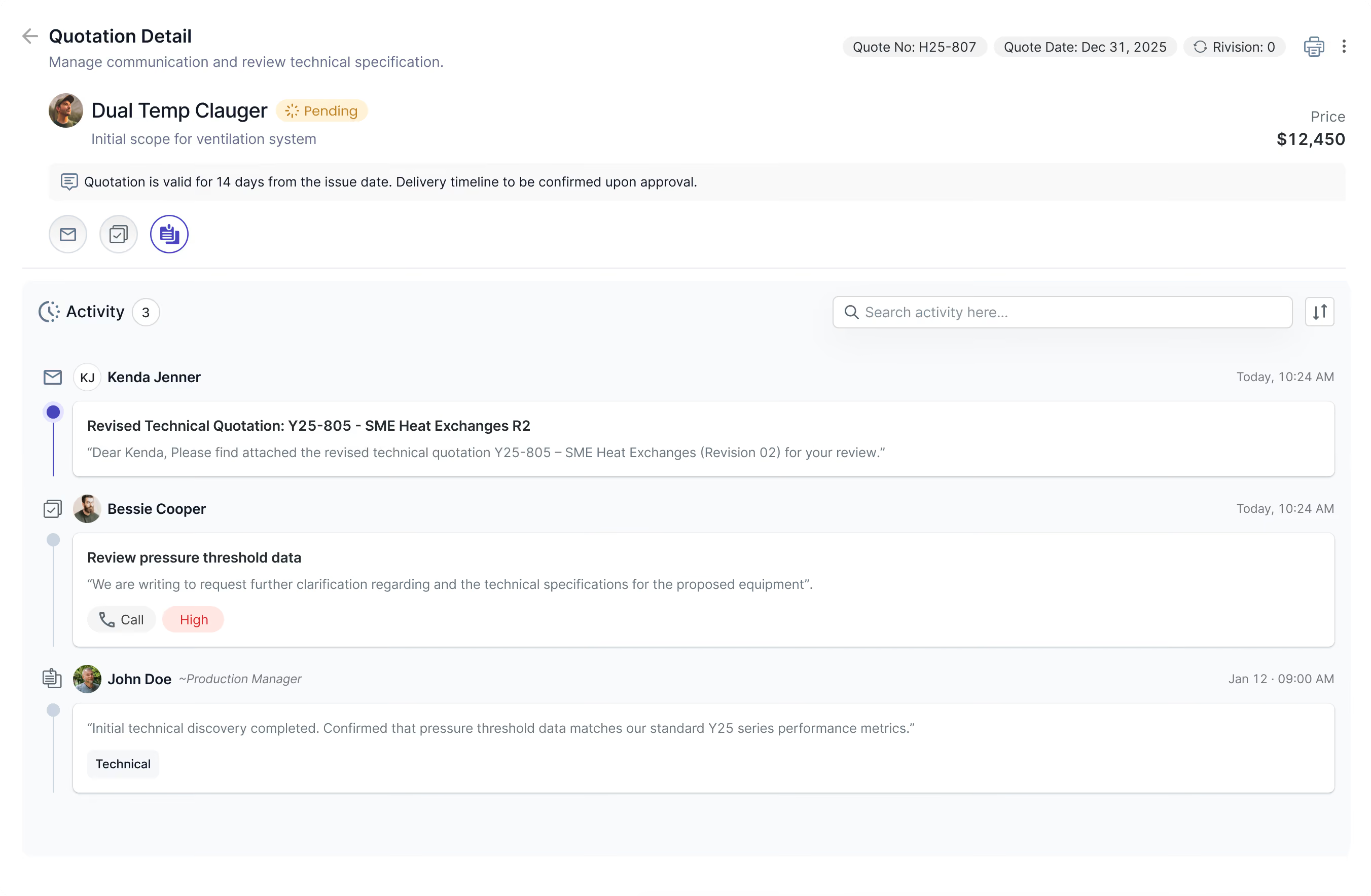
Create sales quotations, convert them into orders, and manage approvals and adjustments.
Quotation detail page with pricing, status, and activity timeline.
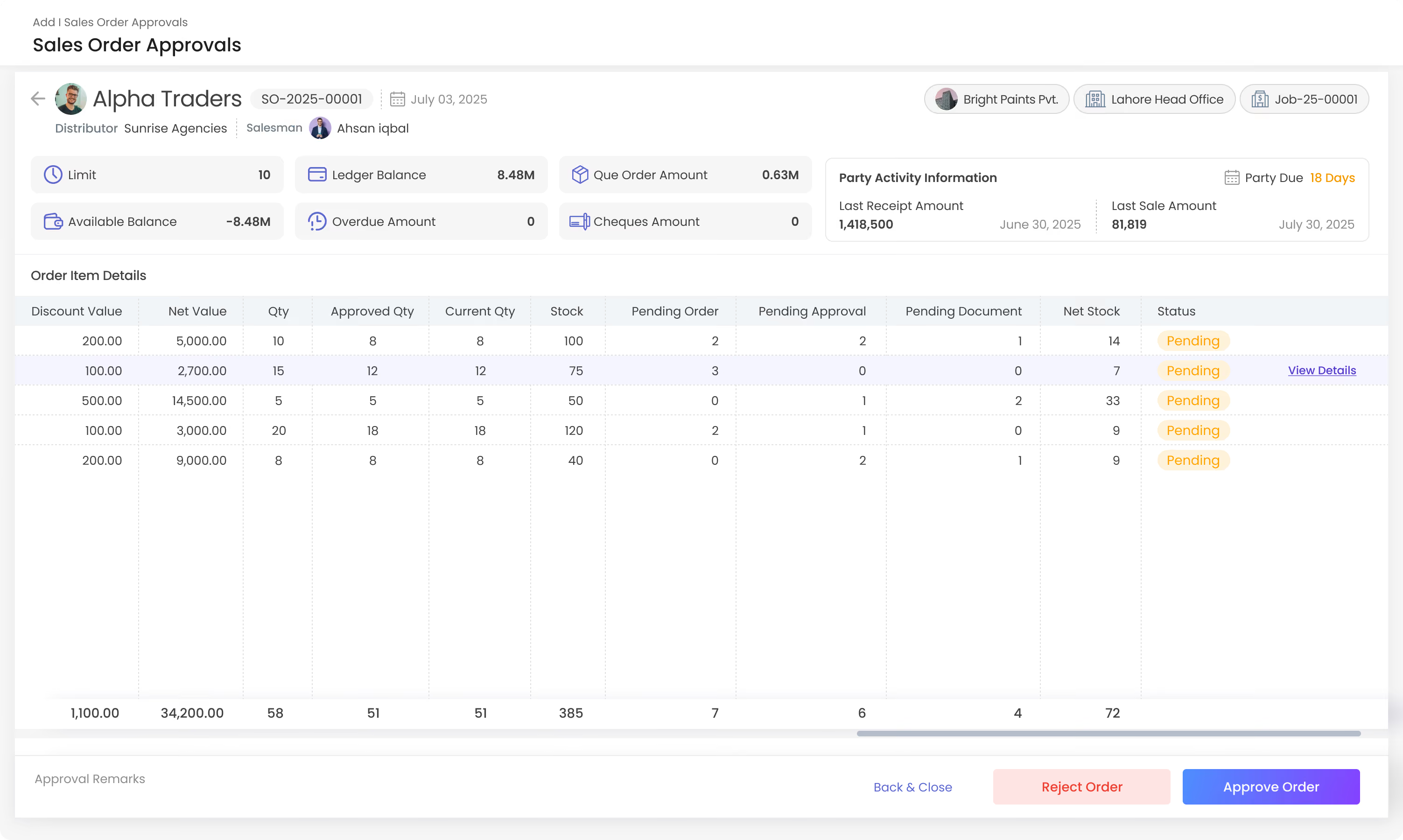
Sales order approval screen with order items and approve/reject options.
Icon depicting a quotation mark with lines resembling text on a page.
Sales Quotation
Icon of a checklist on a clipboard with four boxes and checkmarks, representing an order or task list.
Sales Order
Icon showing two overlapping document outlines with a right-pointing arrow by the bottom document's corner, indicating a file export or copy action.
Sales Scheme
Icon of a floppy disk symbolizing a save function inside a rounded square with a light gray background.
Product Booking
A black arrow pointing left with a bent tail on a rounded white square background, representing a back or undo action.
Booking Return
Icon of a calendar with a highlighted date and a magnifying glass over it, symbolizing schedule search or date search.
Sales Adjustment
Quotation detail page with pricing, status, and activity timeline.
Sales order approval screen with order items and approve/reject options.

Keep Every Delivery Moving.

Manage the complete order journey from booking through delivery and returns.
Browser window header showing text 'Order SO-10482 — Fulfillment Status' with three colored buttons on the left side: red, yellow, and green.
Two concentric dark blue circles on a white background with a solid smaller dark blue circle in the center.
Book
Two concentric dark blue circles on a white background with a solid smaller dark blue circle in the center.
Confirmed
Two concentric dark blue circles on a white background with a solid smaller dark blue circle in the center.
Packed
Two concentric dark blue circles on a white background with a solid smaller dark blue circle in the center.
Dispatched
Two concentric dark blue circles on a white background with a solid smaller dark blue circle in the center.
Delivered
Icon depicting a quotation mark with lines resembling text on a page.
Delivery Order
Icon showing two overlapping document outlines with a right-pointing arrow by the bottom document's corner, indicating a file export or copy action.
Delivery Challan
A black arrow pointing left with a bent tail on a rounded white square background, representing a back or undo action.
Product Delivery
Icon depicting a quotation mark with lines resembling text on a page.
Delivery Return
Icon depicting a quotation mark with lines resembling text on a page.
Outward Gatepass
Invoicing

Connect Sales With Invoicing.

Create invoices, record payments, and manage sales details with ease.
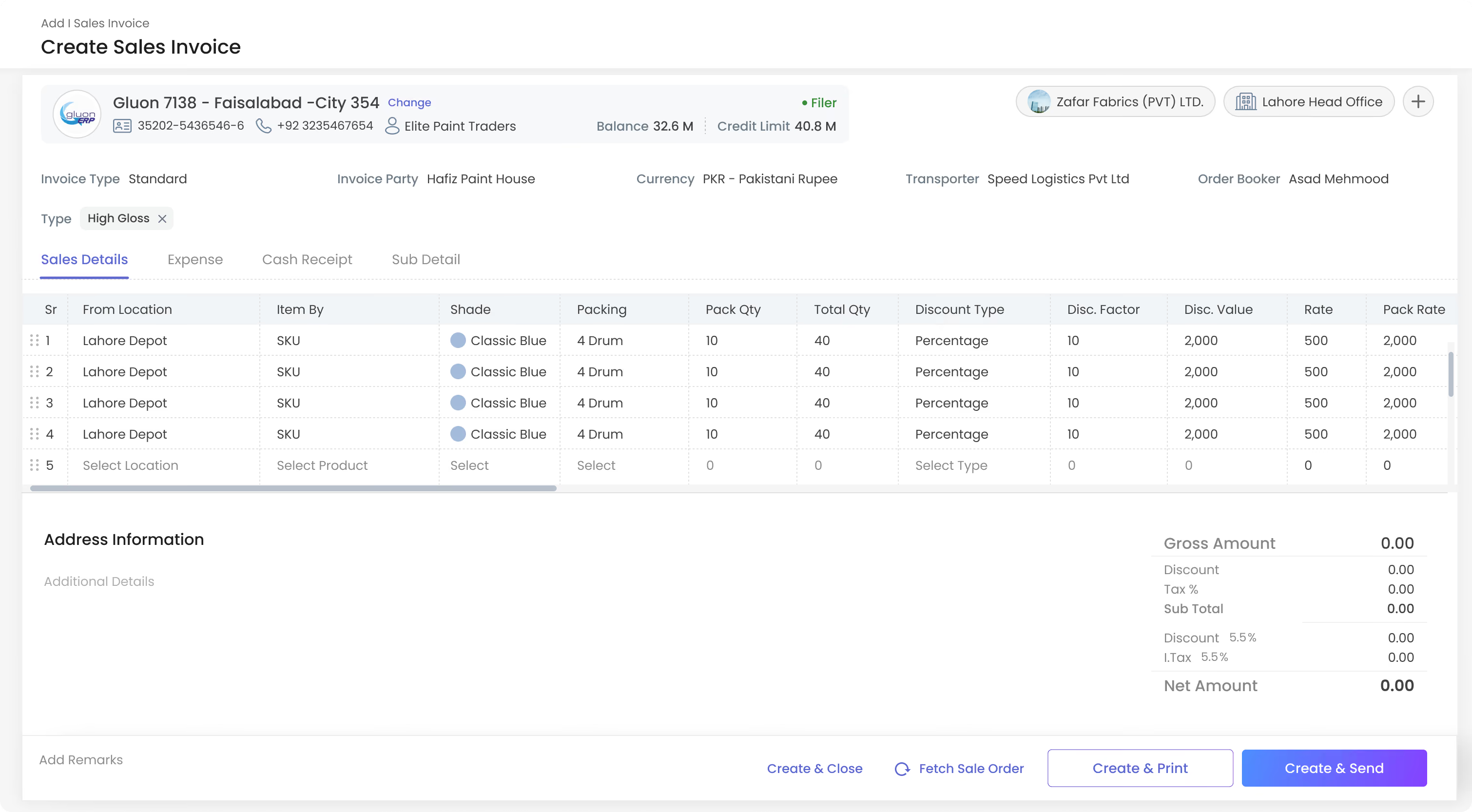
Create sales invoice form with item details and pricing
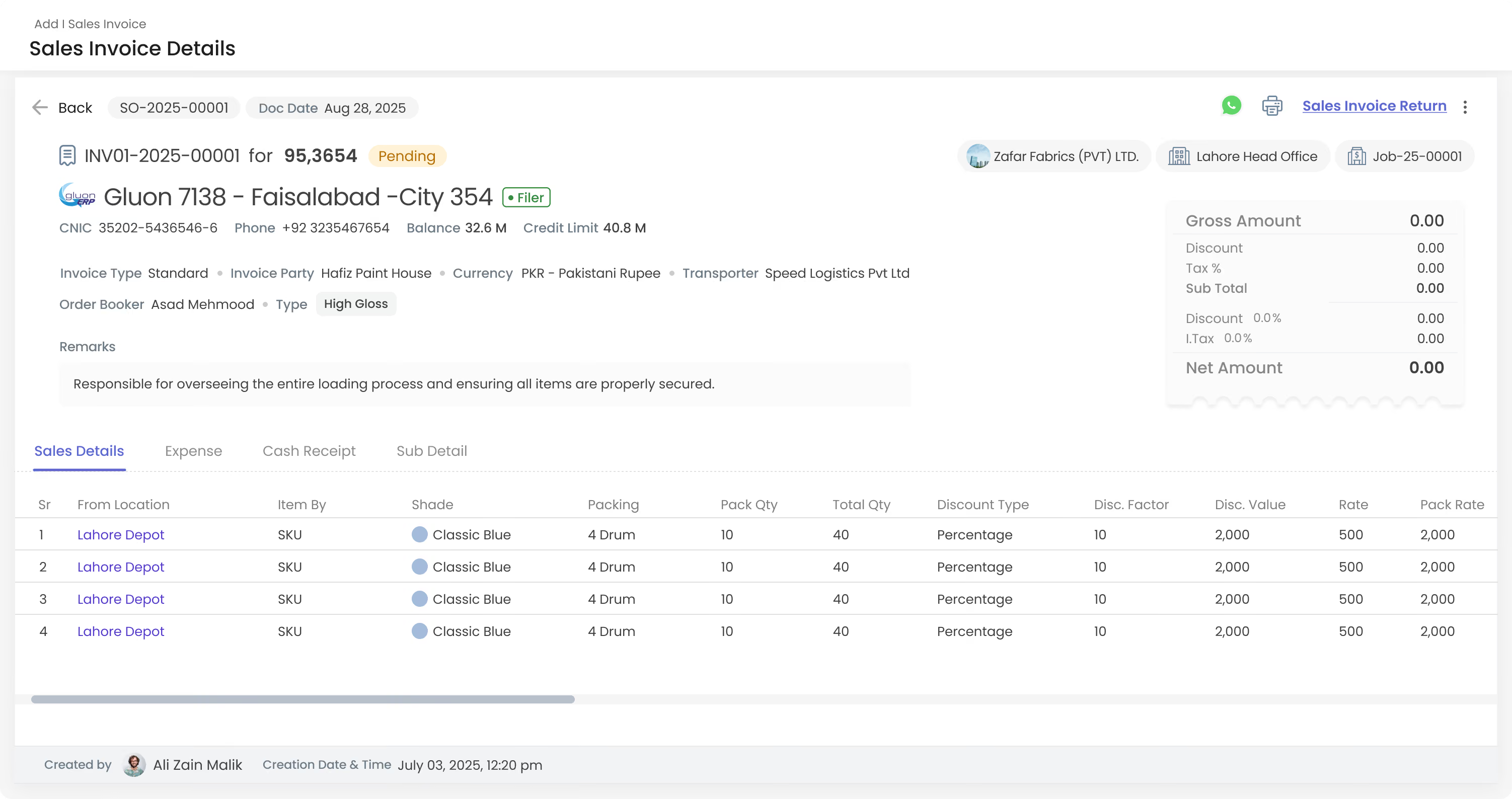
Sales invoice details page showing invoice items and totals.
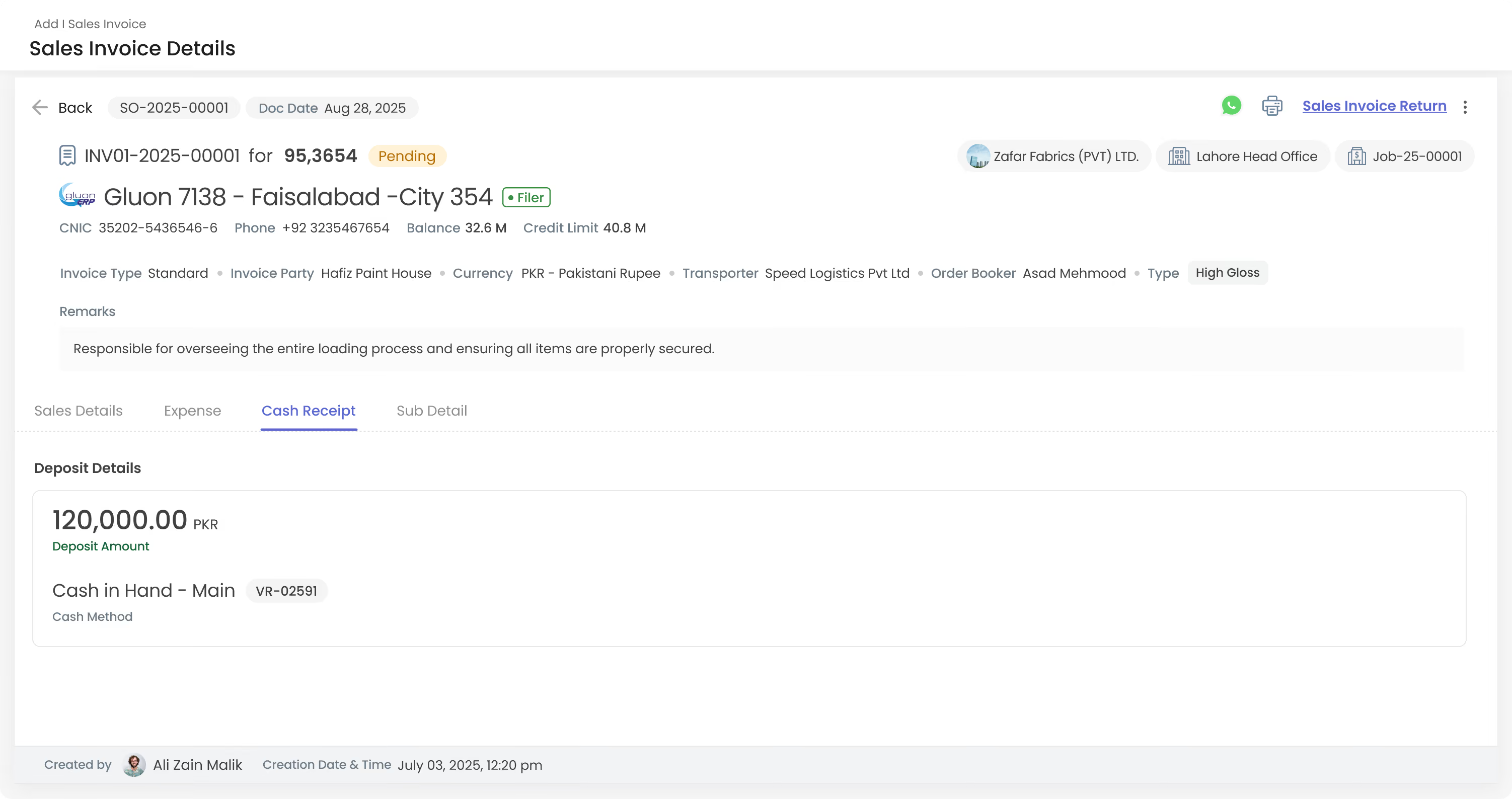
Sales invoice cash receipt tab showing deposit details.
Create sales invoice form with item details and pricing
Sales invoice details page showing invoice items and totals.
Sales invoice cash receipt tab showing deposit details.
Recovery

Turn Sales Into Revenue.

sales invoices, manage sales details, record payments, and process returns.
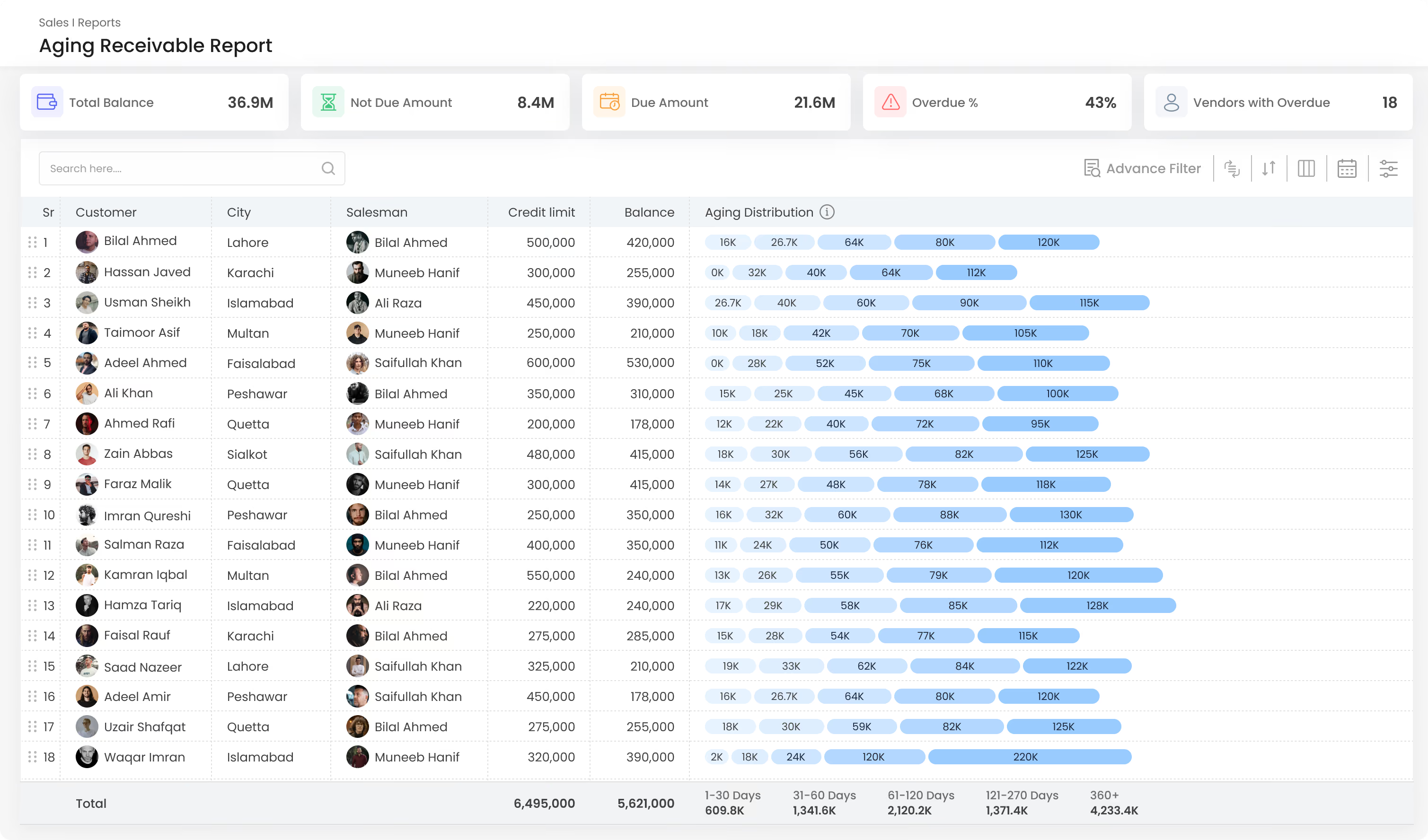
Aging Receivable Report dashboard showing totals: 36.9M balance, 8.4M not due, 21.6M due, 43% overdue, and 18 vendors with overdue. A table lists 18 customers with columns: Sr, Customer (with photos), City, Salesman (with photos), Credit limit, Balance, and Aging Distribution represented by horizontal blue bars with amounts for aging periods 1-30 days, 31-60 days, 61-120 days, 121-270 days, and 360+ days. Total credit limit is 6,495,000 and balance 5,621,000 with aging days totals below the table.
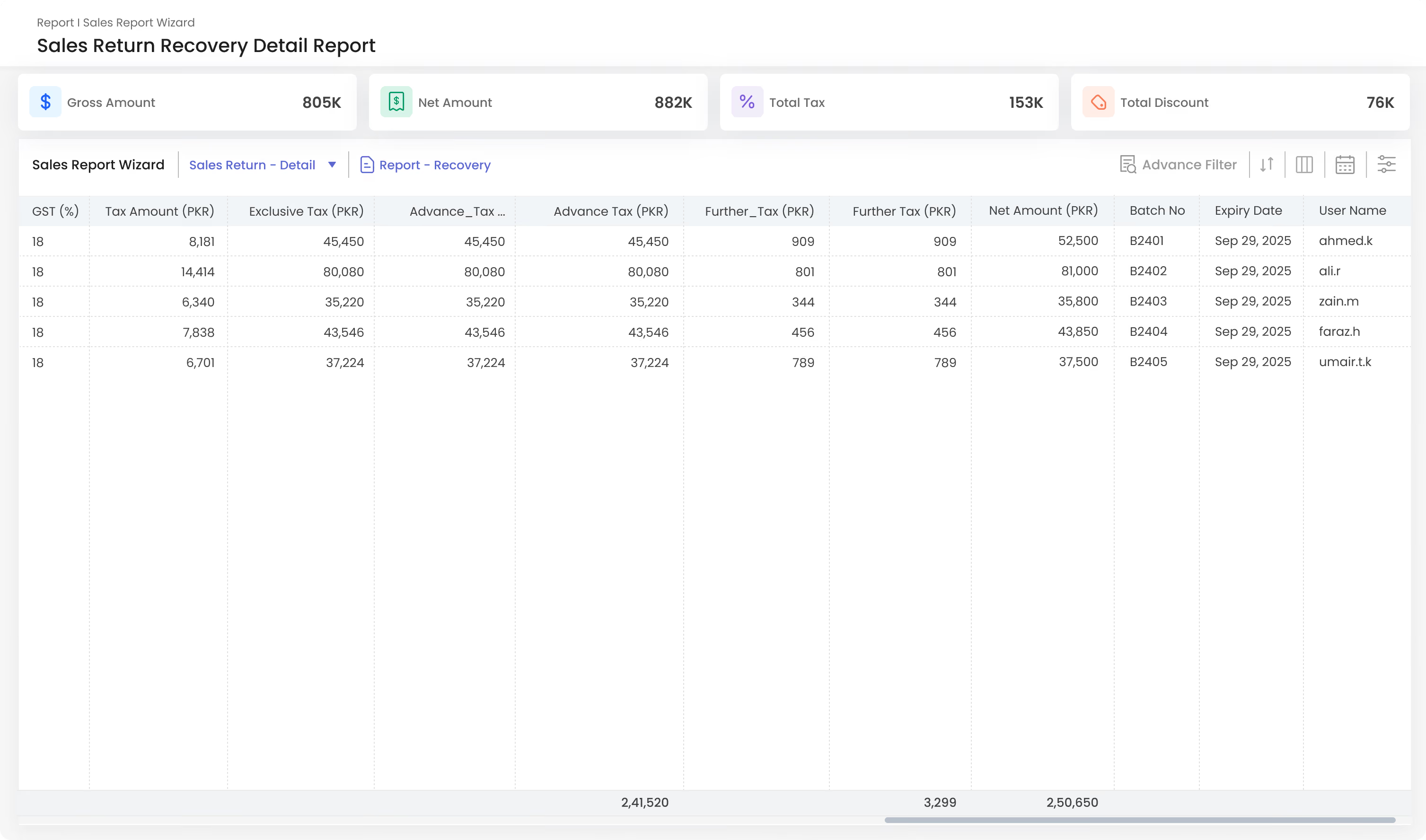
Sales Return Recovery Detail Report showing financial data including Gross Amount 805K, Net Amount 882K, Total Tax 153K, and Total Discount 76K. A detailed table lists GST percentage at 18%, tax amounts, exclusive tax, advance tax, further tax, net amounts in PKR, batch numbers B2401 to B2405, expiry date Sep 29, 2025, and user names from ahmed.k to umair.t.k.
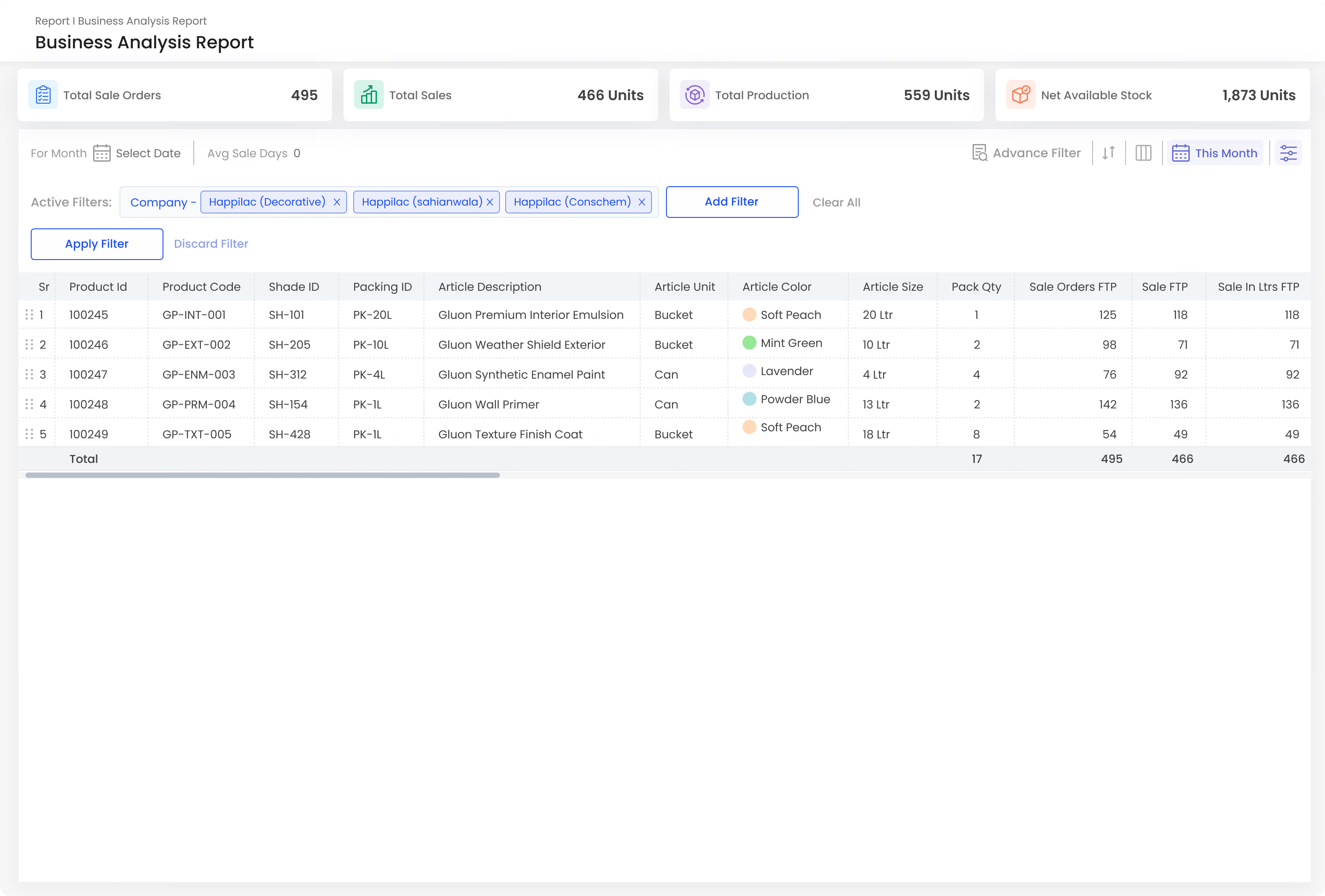
Business Analysis Report showing total sale orders at 495, total sales 466 units, total production 559 units, and net available stock 1,873 units. The table lists five products with details including product ID, product code, shade ID, packing ID, article description, unit, color, size, pack quantity, and sales orders data. Products include Gluon Premium Interior Emulsion, Gluon Weather Shield Exterior, Gluon Synthetic Enamel Paint, Gluon Wall Primer, and Gluon Texture Finish Coat, with colors such as Soft Peach, Mint Green, Lavender, and Powder Blue.
Aging Receivable Report dashboard showing totals: 36.9M balance, 8.4M not due, 21.6M due, 43% overdue, and 18 vendors with overdue. A table lists 18 customers with columns: Sr, Customer (with photos), City, Salesman (with photos), Credit limit, Balance, and Aging Distribution represented by horizontal blue bars with amounts for aging periods 1-30 days, 31-60 days, 61-120 days, 121-270 days, and 360+ days. Total credit limit is 6,495,000 and balance 5,621,000 with aging days totals below the table.
Sales Return Recovery Detail Report showing financial data including Gross Amount 805K, Net Amount 882K, Total Tax 153K, and Total Discount 76K. A detailed table lists GST percentage at 18%, tax amounts, exclusive tax, advance tax, further tax, net amounts in PKR, batch numbers B2401 to B2405, expiry date Sep 29, 2025, and user names from ahmed.k to umair.t.k.
Business Analysis Report showing total sale orders at 495, total sales 466 units, total production 559 units, and net available stock 1,873 units. The table lists five products with details including product ID, product code, shade ID, packing ID, article description, unit, color, size, pack quantity, and sales orders data. Products include Gluon Premium Interior Emulsion, Gluon Weather Shield Exterior, Gluon Synthetic Enamel Paint, Gluon Wall Primer, and Gluon Texture Finish Coat, with colors such as Soft Peach, Mint Green, Lavender, and Powder Blue.
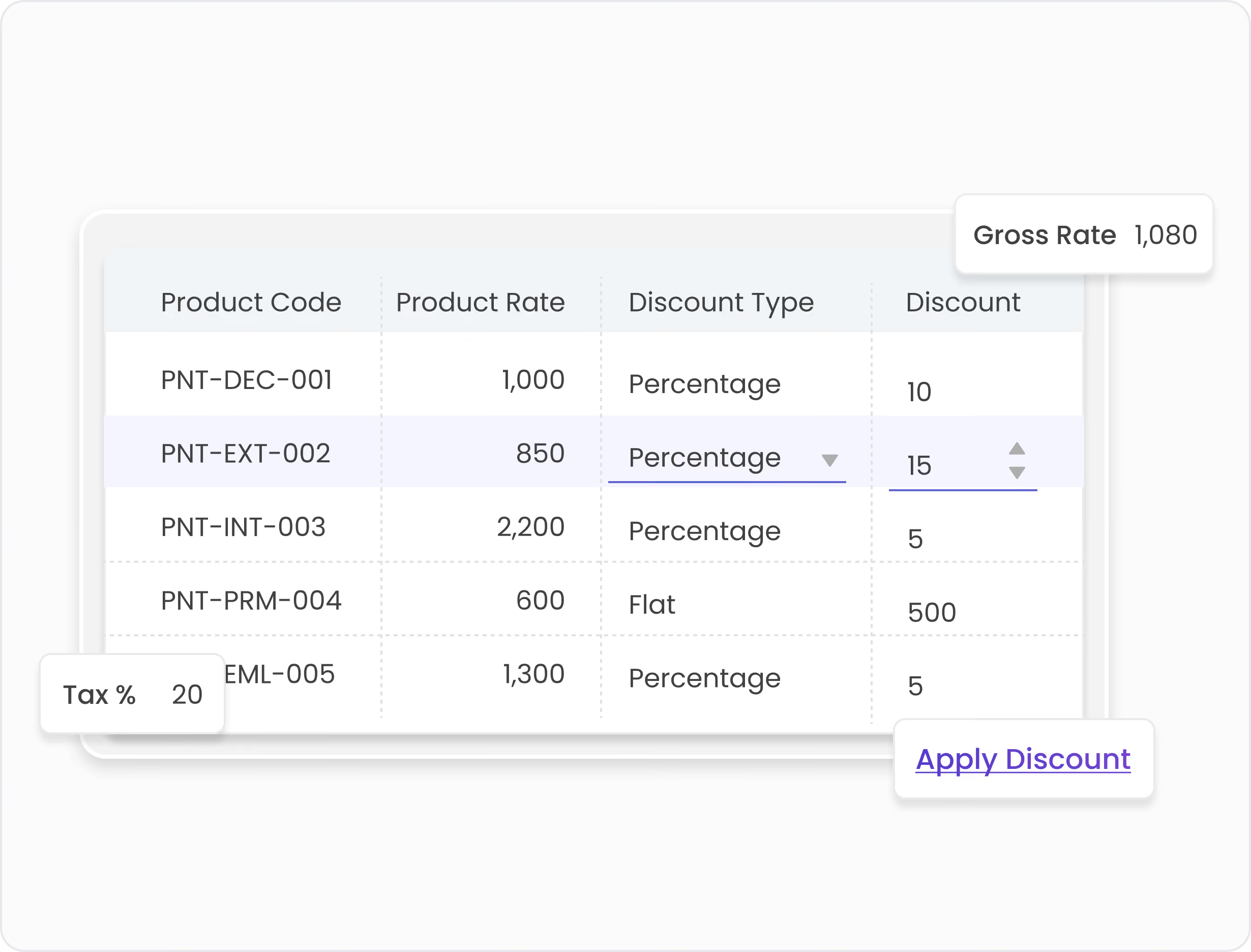
Table showing product codes, product rates, discount types, and discount values with tax rate 20% and gross rate 1080 for various items, alongside an Apply Discount link.
Pricing & Control

Keep Pricing Under Control.

Manage rates, discounts, and taxes with ease.
A dashboard showing statuses of FBR invoice tasks: Invoice Tracking marked Live, FBR Invoice Approvals with 10 Pending, FBR Configuration Connected, FBR Failed Vouchers with 3 flagged, and Digital Invoice Integration marked Active.
Compliance

Stay Connected to FBR.

Track FBR invoices, approvals, and compliance.

Ready to Make Sales Simpler?

Manage orders, deliveries, invoicing, and recovery.
Book a Demo
Point of Sale

Close Every Shift with Total Accuracy.
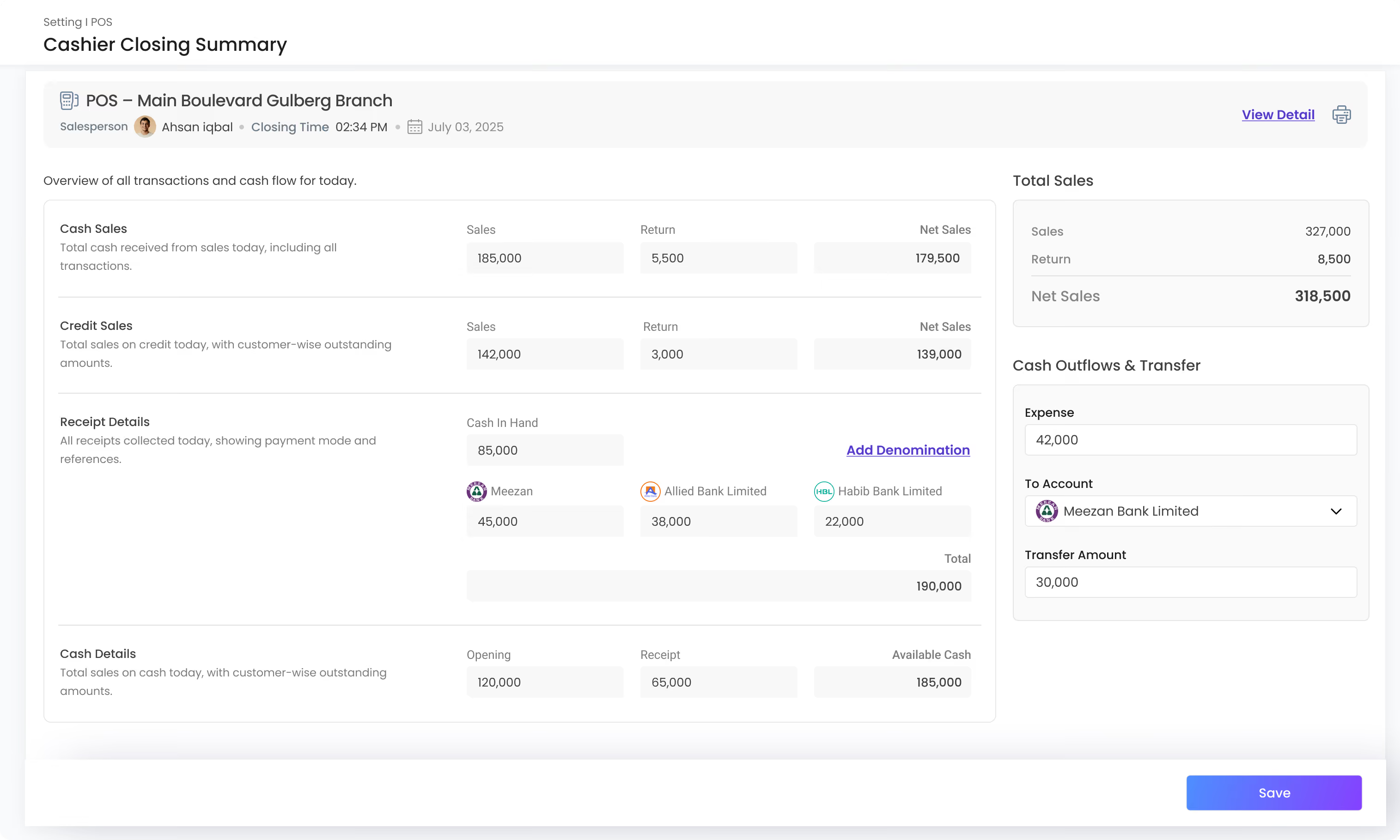
Counter sales, product scanning, and cashier closing all connected straight to the ERP.
Cashier Closing Summary for POS Main Boulevard Gulberg Branch showing salesperson Ahsan Iqbal, closing time 02:34 PM on July 03, 2025. Overview of all transactions and cash flow includes: Cash Sales with 185,000 sales, 5,500 returns, net sales 179,500; Credit Sales with 142,000 sales, 3,000 returns, net sales 139,000. Receipt details show cash in hand 85,000, Meezan Bank 45,000, Allied Bank Limited 38,000, Habib Bank Limited 22,000, total 190,000. Cash details show opening 120,000, receipt 65,000, available cash 185,000. Total sales summary: sales 327,000, returns 8,500, net sales 318,500. Cash outflows and transfer: expense 42,000, transfer to Meezan Bank Limited 30,000. Save button at bottom right.
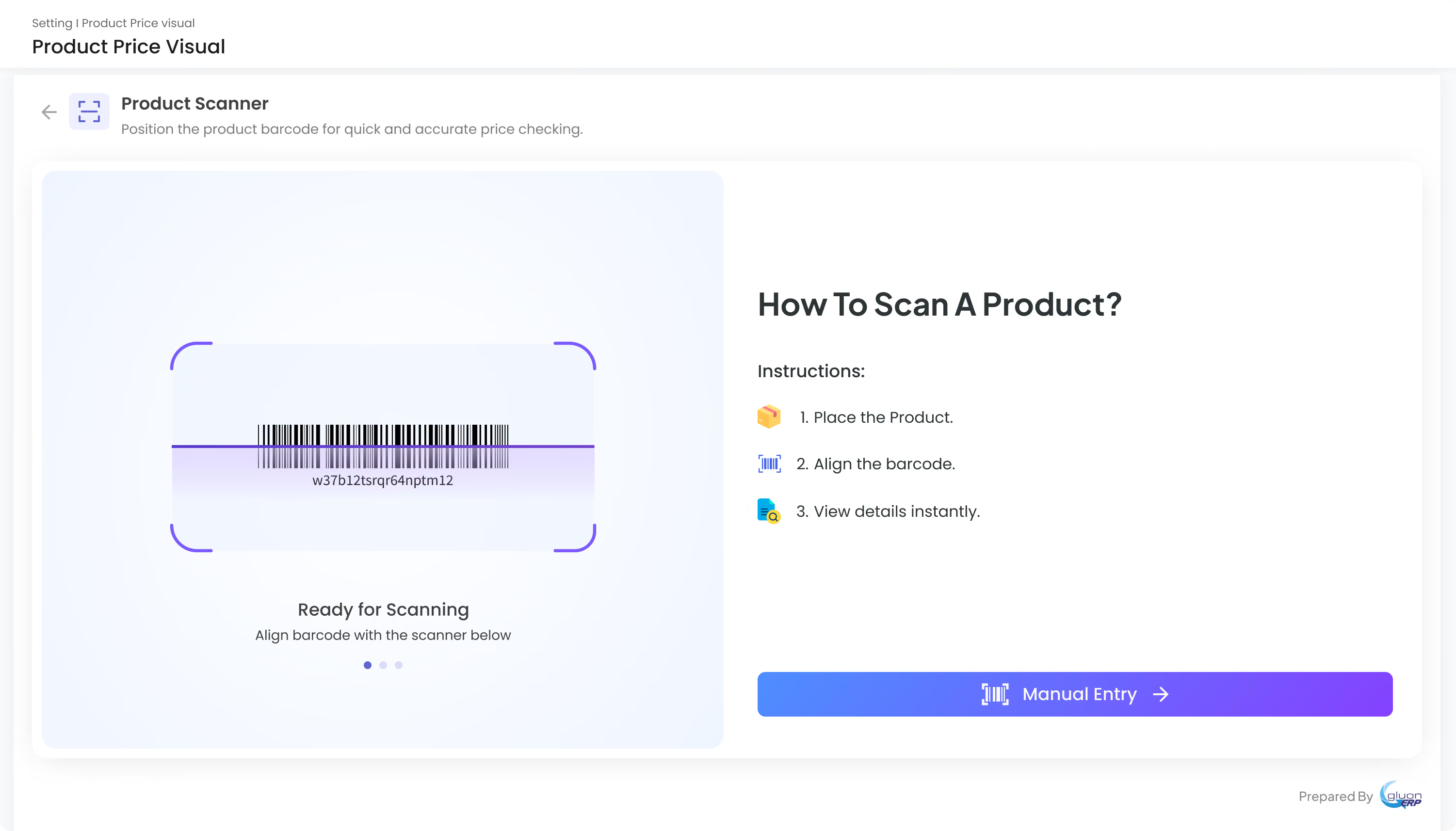
Product scanner interface with a barcode centered in a scanning frame and a purple scanning line. Instructions on the right explain how to scan a product: place the product, align the barcode, and view details instantly. A blue and purple gradient button labeled 'Manual Entry' is below the instructions. The interface header reads 'Product Price Visual' and includes a back arrow and icon. The bottom right shows 'Prepared By' with a Gluon ERP logo.
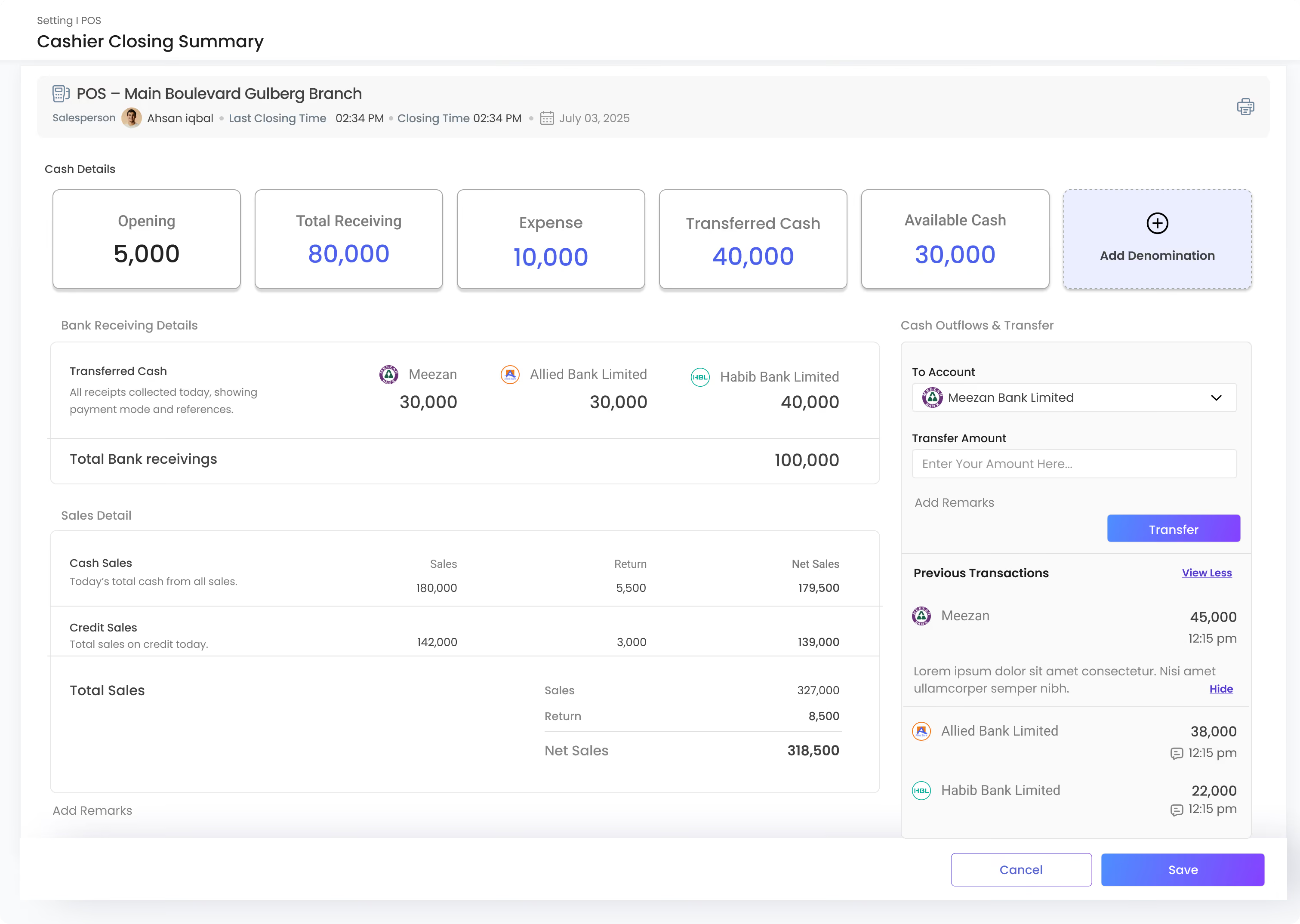
Cashier Closing Summary screen for POS Main Boulevard Gulberg Branch showing salesperson Ahsan Iqbal's last and closing time at 2:34 PM on July 3, 2025. Cash details include Opening 5,000, Total Receiving 80,000, Expense 10,000, Transferred Cash 40,000, and Available Cash 30,000. Bank Receiving Details lists 30,000 to Meezan, 30,000 to Allied Bank Limited, and 40,000 to Habib Bank Limited, totaling 100,000. Sales Detail shows Cash Sales with 180,000 sales and 5,500 returns for net 179,500; Credit Sales with 142,000 sales and 3,000 returns for net 139,000; total sales June 327,000, returns 8,500, net sales 318,500. Cash Outflows & Transfer section allows choosing an account from Meezan Bank Limited, entering transfer amount and remarks, with a Transfer button. Previous transactions display transfers of 45,000 to Meezan, 38,000 to Allied Bank, and 22,000 to Habib Bank with timestamps and remarks. Buttons to cancel or save are at the bottom.
Cashier Closing Summary for POS Main Boulevard Gulberg Branch showing salesperson Ahsan Iqbal, closing time 02:34 PM on July 03, 2025. Overview of all transactions and cash flow includes: Cash Sales with 185,000 sales, 5,500 returns, net sales 179,500; Credit Sales with 142,000 sales, 3,000 returns, net sales 139,000. Receipt details show cash in hand 85,000, Meezan Bank 45,000, Allied Bank Limited 38,000, Habib Bank Limited 22,000, total 190,000. Cash details show opening 120,000, receipt 65,000, available cash 185,000. Total sales summary: sales 327,000, returns 8,500, net sales 318,500. Cash outflows and transfer: expense 42,000, transfer to Meezan Bank Limited 30,000. Save button at bottom right.
Product scanner interface with a barcode centered in a scanning frame and a purple scanning line. Instructions on the right explain how to scan a product: place the product, align the barcode, and view details instantly. A blue and purple gradient button labeled 'Manual Entry' is below the instructions. The interface header reads 'Product Price Visual' and includes a back arrow and icon. The bottom right shows 'Prepared By' with a Gluon ERP logo.
Cashier Closing Summary screen for POS Main Boulevard Gulberg Branch showing salesperson Ahsan Iqbal's last and closing time at 2:34 PM on July 3, 2025. Cash details include Opening 5,000, Total Receiving 80,000, Expense 10,000, Transferred Cash 40,000, and Available Cash 30,000. Bank Receiving Details lists 30,000 to Meezan, 30,000 to Allied Bank Limited, and 40,000 to Habib Bank Limited, totaling 100,000. Sales Detail shows Cash Sales with 180,000 sales and 5,500 returns for net 179,500; Credit Sales with 142,000 sales and 3,000 returns for net 139,000; total sales June 327,000, returns 8,500, net sales 318,500. Cash Outflows & Transfer section allows choosing an account from Meezan Bank Limited, entering transfer amount and remarks, with a Transfer button. Previous transactions display transfers of 45,000 to Meezan, 38,000 to Allied Bank, and 22,000 to Habib Bank with timestamps and remarks. Buttons to cancel or save are at the bottom.
Icon depicting a quotation mark with lines resembling text on a page.
POS
Icon showing two overlapping document outlines with a right-pointing arrow by the bottom document's corner, indicating a file export or copy action.
POS Entry
A black arrow pointing left with a bent tail on a rounded white square background, representing a back or undo action.
Product Scanner
A black arrow pointing left with a bent tail on a rounded white square background, representing a back or undo action.
POS Configuration
Reporting

Know Where Every Rupee Stands

Transactions turned into insight by customer, product and team.
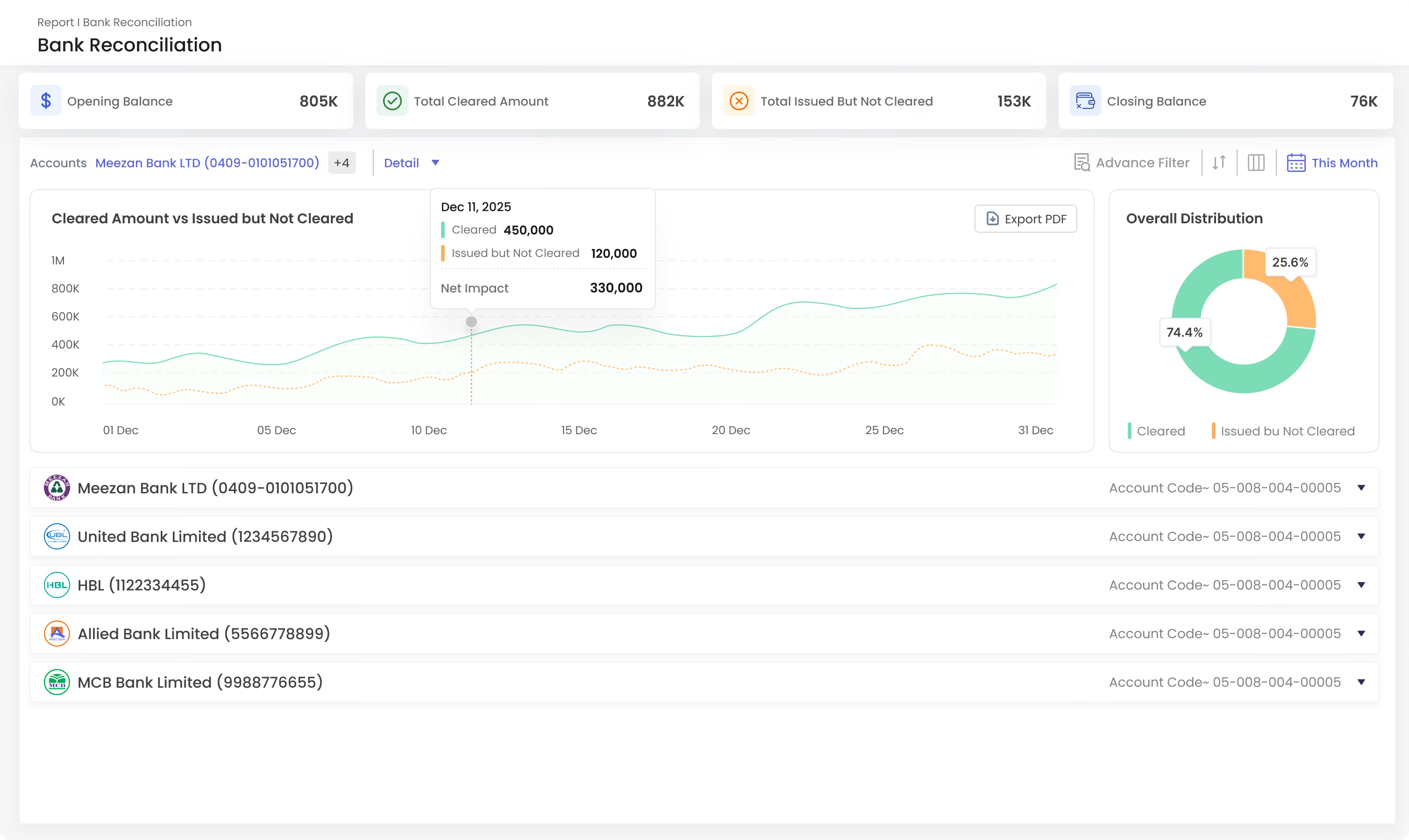
Bank Reconciliation report dashboard showing financial metrics: Opening Balance 805K, Total Cleared Amount 882K, Total Issued But Not Cleared 153K, and Closing Balance 76K. A line chart titled 'Cleared Amount vs Issued but Not Cleared' trends daily amounts from December 1 to 31 with cleared amounts in green and issued but not cleared in orange, highlighting on Dec 11 cleared 450,000 and issued 120,000 with net impact 330,000. A donut chart shows overall distribution with 74.4% cleared and 25.6% issued but not cleared. Listed accounts include Meezan Bank LTD, United Bank Limited, HBL, Allied Bank Limited, and MCB Bank Limited with account codes.
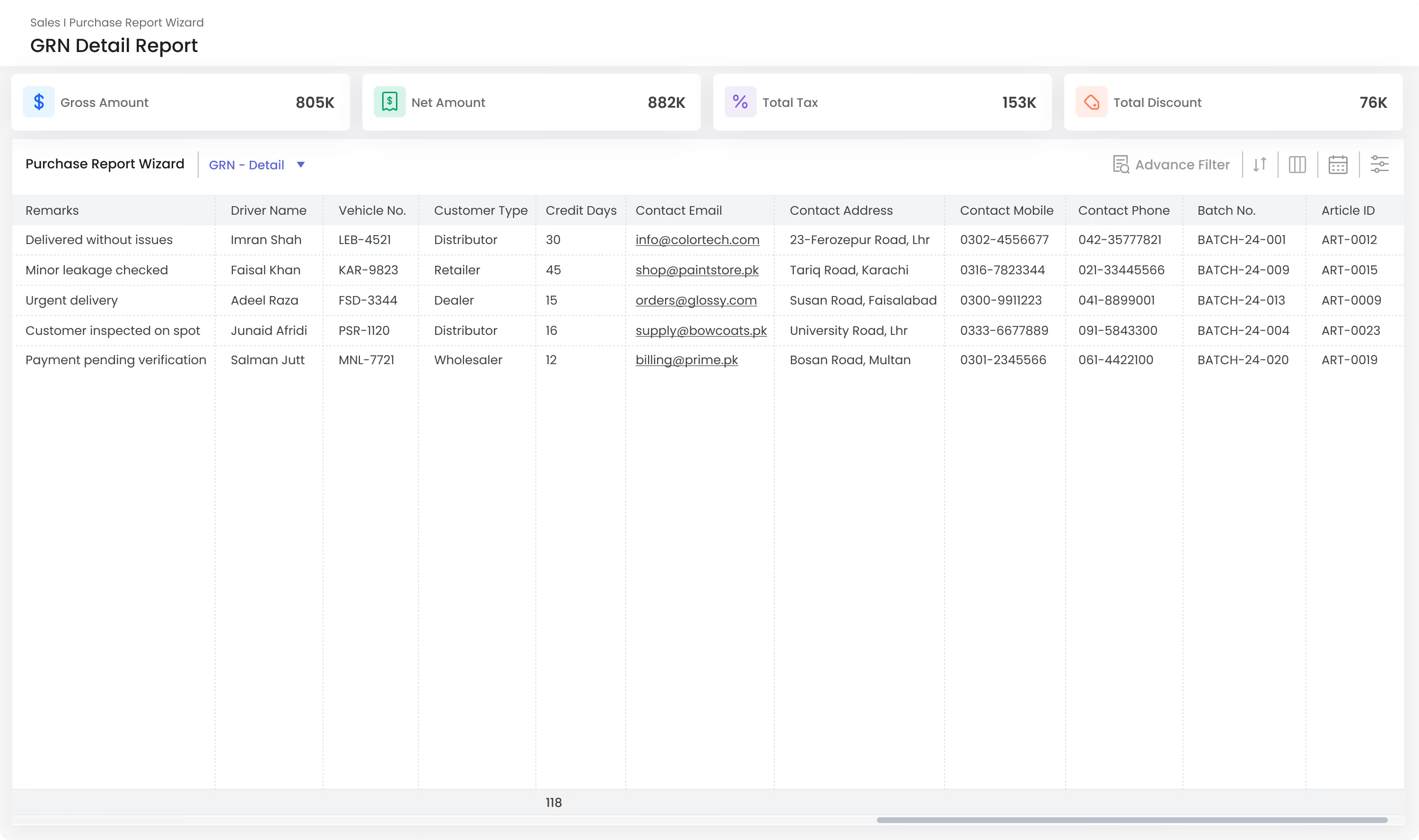
Dashboard titled Sales Purchase Report Wizard showing GRN Detail Report with key metrics: Gross Amount 805K, Net Amount 882K, Total Tax 153K, Total Discount 76K. Table includes columns for Remarks, Driver Name, Vehicle No., Customer Type, Credit Days, Contact Email, Contact Address, Contact Mobile, Contact Phone, Batch No., and Article ID. Sample data rows show remarks like Delivered without issues, Minor leakage checked, Urgent delivery, Customer inspected on spot, and Payment pending verification with corresponding details of drivers, vehicles, customer types, contacts, and batch/article IDs.
Bank Reconciliation report dashboard showing financial metrics: Opening Balance 805K, Total Cleared Amount 882K, Total Issued But Not Cleared 153K, and Closing Balance 76K. A line chart titled 'Cleared Amount vs Issued but Not Cleared' trends daily amounts from December 1 to 31 with cleared amounts in green and issued but not cleared in orange, highlighting on Dec 11 cleared 450,000 and issued 120,000 with net impact 330,000. A donut chart shows overall distribution with 74.4% cleared and 25.6% issued but not cleared. Listed accounts include Meezan Bank LTD, United Bank Limited, HBL, Allied Bank Limited, and MCB Bank Limited with account codes.
Dashboard titled Sales Purchase Report Wizard showing GRN Detail Report with key metrics: Gross Amount 805K, Net Amount 882K, Total Tax 153K, Total Discount 76K. Table includes columns for Remarks, Driver Name, Vehicle No., Customer Type, Credit Days, Contact Email, Contact Address, Contact Mobile, Contact Phone, Batch No., and Article ID. Sample data rows show remarks like Delivered without issues, Minor leakage checked, Urgent delivery, Customer inspected on spot, and Payment pending verification with corresponding details of drivers, vehicles, customer types, contacts, and batch/article IDs.
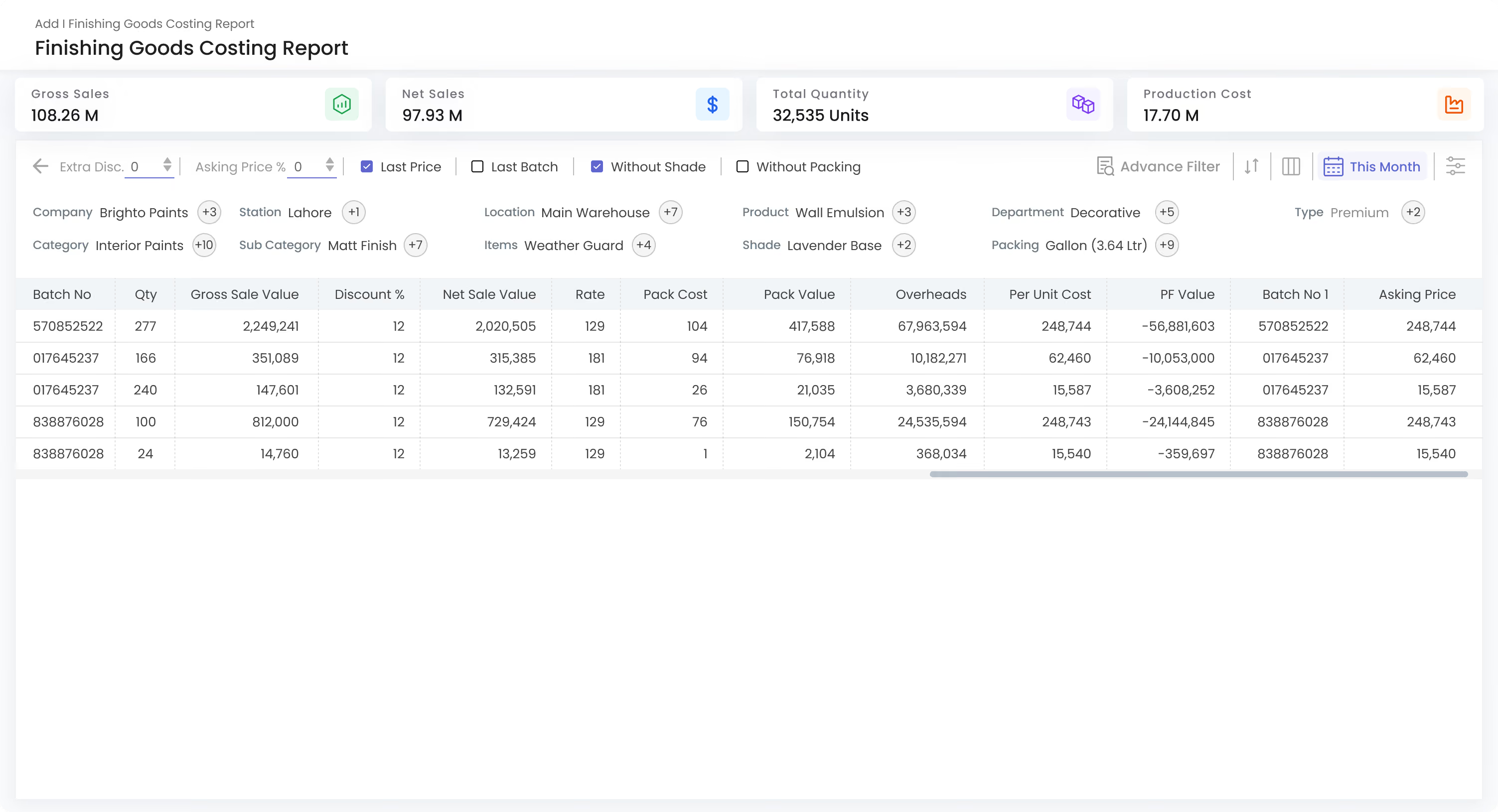
Finishing Goods Costing Report dashboard showing gross sales of 108.26M, net sales of 97.93M, total quantity of 32,535 units, and production cost of 17.70M. Filter options include company Brighto Paints, station Lahore, location Main Warehouse, product Wall Emulsion, department Decorative, type Premium, category Interior Paints, subcategory Matt Finish, items Weather Guard, shade Lavender Base, and packing Gallon (3.64 Ltr). A table lists batch numbers, quantities, gross sale value, discount percentage, net sale value, rate, pack cost, pack value, overheads, per unit cost, PF value, batch no 1, and asking price for five batches.
Icon depicting a quotation mark with lines resembling text on a page.
Sales Report
Icon showing two overlapping document outlines with a right-pointing arrow by the bottom document's corner, indicating a file export or copy action.
Sales Summary
A black arrow pointing left with a bent tail on a rounded white square background, representing a back or undo action.
Product-wise Sales
Icon of a document with a small bar chart showing three vertical bars of increasing height inside it.
Product-wise Profit
Icon of a clipboard with a checklist showing a bar chart with three vertical bars and a checkmark.
Net Sales Report
Icon of a clipboard with a medical cross symbol, representing health or medical registration.
Sales Register
Clipboard icon with a piece of paper and three lines representing text on a white rounded square background.
Sales Target Report
Icon of a sales chart inside a hexagon, representing sales performance or analytics.
Sales Delivery Summary
Icon of a clipboard with a checklist showing a bar chart with three vertical bars and a checkmark.
Sales Return Report
Icon showing a blank document with a folded corner and an arrow pointing diagonally upward, representing file upload or export.
Profit & Loss Report
Icon of a document with a small bar chart showing three vertical bars of increasing height inside it.
Customer-wise Sales
Icon of a document with text lines and a currency symbol, representing a sales or financial report.
Monthly Sales Report

Every Sales Setting, In One Place.

Pricing, tax, approvals and territories, set to match how you sell.
Simple gray icon of a user profile consisting of a circle for the head and a curved trapezoid for the shoulders and upper body.
Customer Settings
Outlined icon of a checkmark inside a rounded square box.
Sales Terms
Icon of a document with a folded top right corner and horizontal lines representing text.
Invoice Tax
Icon of a receipt with a money symbol and horizontal lines representing text.
POS Configuration
Icon of a contact card with a profile silhouette on the left and three horizontal lines representing text on the right.
Default Account
Simple black and white line drawing of a house with a door, two windows, and a chimney on the roof.
Commission Rules
Percentage symbol (%) in black on a white background.
Calculation Formula
Gray shield icon with three horizontal lines near the top.
Tax Rule
Icon of an envelope with a gear symbol on the lower right, representing email settings or options.
Email Configuration
Icon of a document with a gear symbol, representing document configuration settings.
FBR Configuration

One platform.
Every part of your business.

and
working together in one powerful, connected platform.
Book a Demo
Built to simplify. Designed to scale.